
Feature Transition: Viewer Markups from Adept 11.3.3 to Adept 11.4.0
Applicable Adept Release: WINTER '25 (11.4.0)
Intended Audience: Customers who use Markup objects in the Viewer
Last Update:
Introduction
Adept Viewer offers 13 markup object types, including Measure, each with three to seven user-modifiable properties. In the first five releases, we continuously enhanced and expanded markup capabilities. However, we eventually reached the limits of the existing technology.
This new release marks a significant advancement in how markups are created and presented, laying the foundation for future enhancements and additions.
While most markup fidelity has been preserved, some incompatibilities have emerged from this modernization. This document outlines these differences, highlights key enhancements, and notes several limitations that may impact workflows during an Adept upgrade.
Deltas Tables
Markup Editing | Adept 11.3.3 Markup Behavior(s) | Adept 11.4.0 Markup Behavior(s) | Issue ID(s) |
|---|---|---|---|
Grip Select Move | Does not provide a preview of the change; instead, it directly affects the original shape. 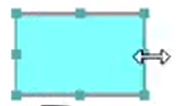 Adept 11.3.3 -Resizing with a grip.
| Provides a new preview of the change and leaves the original shape as a visible reference. 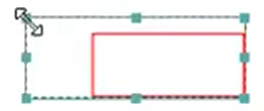 Adept 11.4.0 - Resizing with a grip. | ADV-8320 This is the new accepted behavior. |
Markup Format Topic(s) | Adept 11.3.3 Markup Property(ies) | Adept 11.4.0 Markup Property(ies) | Issue ID(s) |
|---|---|---|---|
Line Weight Same original Zoomed out: 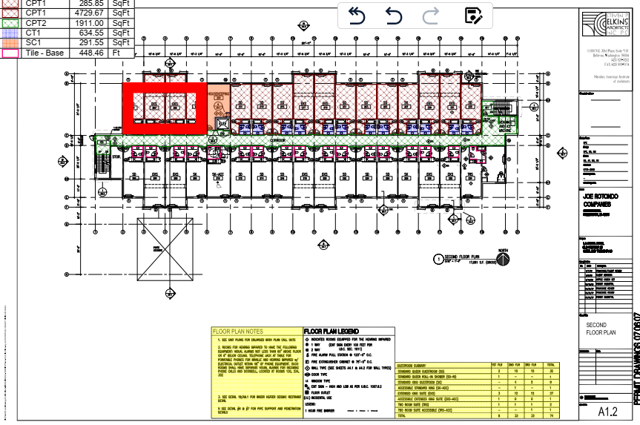 | The zoom factor influenced the Line Weight. Therefore, the weight was lighter when the user zoomed in. 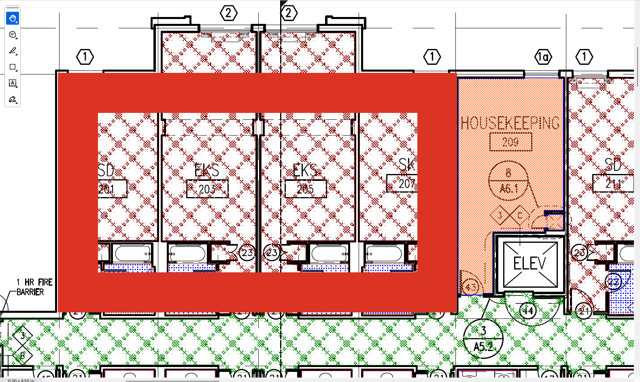 Adept 11.3.3 - Zoomed in Line Weight | The markup object's Line weight is displayed without any influence from the View Frame zoom factor. Therefore, the line weight remains proportional to the original drafted intent & is slightly thicker when the user zooms in than in previous versions. 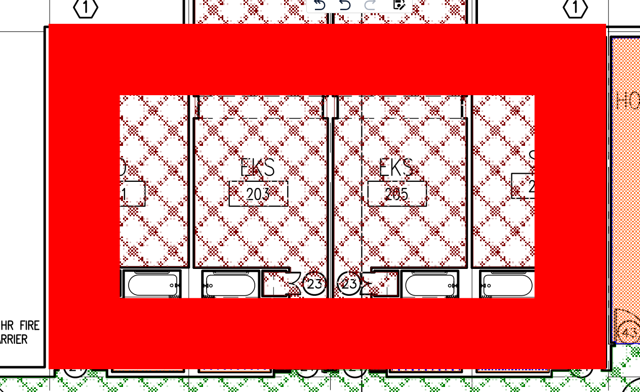 Adept 11.4.0 - Zoomed in Line Weight | ADV-8574 This is the new accepted behavior. |
Line Style Segments Ends | 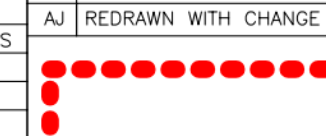 Adept 11.3.3 - Linetype segments have round ends. | 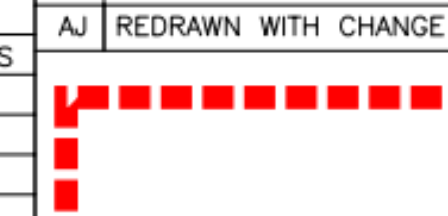 Adept 11.4.0 - Markup objects' Linetype segments now have square ends. | ADV-8012 This is the new accepted behavior. |
Line Style Segment Gaps | Line width affected segment length & gap. Changing the number of pixels of width also changed the number of pixels of gap. 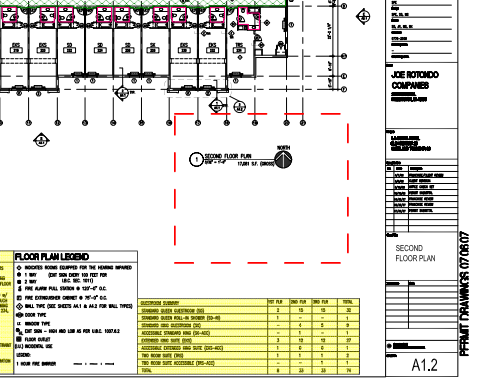 Adept 11.3.3 - LineWeight = 1 px 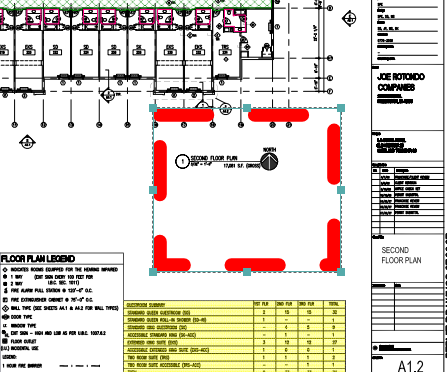 Adept 11.3.3 - LineWeight = 8 px | Markup object's Line width does not affect segment length & gap. So, changing the number of pixels in the width no longer changes the number of pixels in the gap. 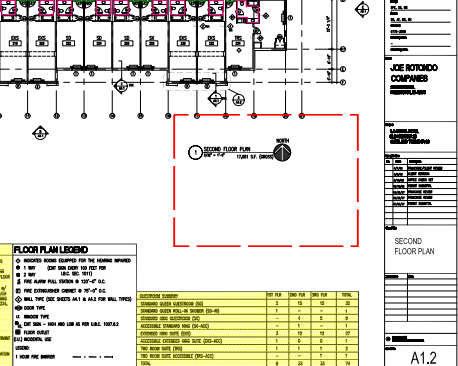 Adept 11.4.0 - LineWeight = 1 px 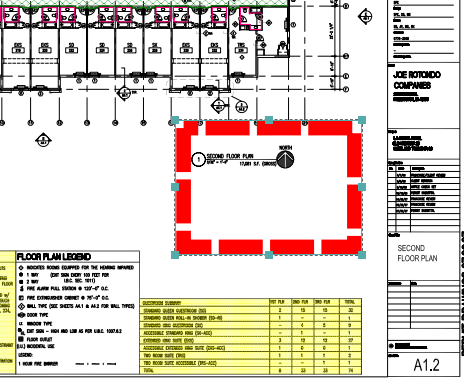 Adept 11.4.0 - LineWeight = 8 px | ADV-8596 ADV-8687 This is the new accepted behavior. |
Markup Object Type(s) | Adept 11.3.3 Markup Behavior(s)/Property(ies) | Adept 11.4.0 Markup Behavior(s)/Property(ies) | Issue ID(s) |
|---|---|---|---|
TextBox, Callout & Polygon | The markup object’s fill color and opacity do not affect text and borders. | The markup object’s fill color and opacity now affect text and border. | ADV-8001 Open Known Issue |
TextBox | Rotation uses a handle allowing free 360-degree movement. | Rotation handle now supports only compass angles: 0°, 90°, 180°, and 270°. | ADV-7756 Open Known Issue |
Callout | The callout arrow knee point can be moved anywhere. | The callout arrow knee point can only move parallel to the original knee line. | ADV-7757 This is the new accepted behavior. |
Rectangle | Boundary line opacity can be changed. | Boundary line opacity cannot change independently of Fill Opacity. | ADV-8932 Open Known Issue |
Rectangle | The boundary line is inside (inscribed) the user’s pick points. Thus, the rectangle is inside the area of interest and may hide content. | The boundary line is outside (superscribed) the user’s pick points. Thus, the rectangle is outside the area of interest and shows all content. | ADV-8453 ADV-8617 This is the new accepted behavior. |
Cloud & Ellipse | All arcs lie fully outside the closed polyline boundary of the user’s pick points. | All arc centroids lie on the polyline boundary of the user’s pick points, slightly reducing the overall area size. | ADV-8933 Open Known Issue |
Cloud |  Adept 11.3.3 - Cloud linetype uses semicircles. |  Adept 11.4.0 - Cloud linetype uses bezier curves. | ADV-7759 This is the new accepted behavior. |
Cloud | 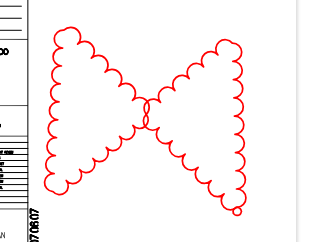 Adept 11.3.3 - Arcs' centers always point inward, regardless of drafting direction. This is not a problem if the user crosses over an area with pick points: | 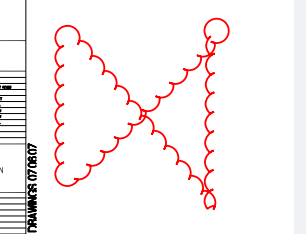 Adept 11.4.0 - Arcs' centers point inward only if drafting counter-clockwise. Drafting clockwise causes arcs centers to face outward. This can cause issues if the user crosses over an area with pick points: | ADV-8616 ADV-8776 Open Known Issue |
Polyline & Line | 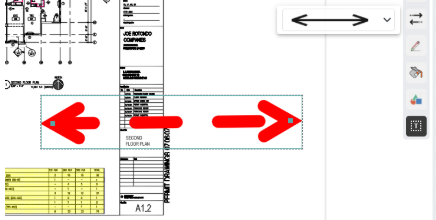 Adept 11.3.3 - Line-end arrows have a continuous line type. | 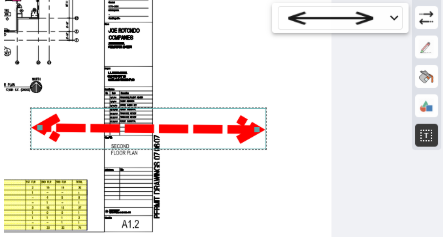 Adept 11.4.0 - Line-end arrows match the parent line type, which may not be continuous. | ADV-8592 Open Known Issue |
Pen | All Pen objects have one segment. | Pen objects on Office documents can have multiple segments. | ADV-8858 Open Known Issue |
Arc & Pen | Line style and end arrows can be applied. | Line style and end arrows cannot be applied. | ADV-8623 Open Known Issue |
Arc | An Arc can have a fill. | An Arc cannot have a fill. | ADV-8463 Open Known Issue |
Signoff | Signoff was built using the TextBox object type. | Signoff is now built using the Symbols object type. | ADV-8465 This is the new accepted behavior. |
Signoff | Signoff provides format properties for Line weight and Line style. | Signoff does not provide format properties for Line weight and Line style. | ADV-8608 Open Known Issue |
Symbols | Anisotropic scaling option is enabled. | Anisotropic scaling option is disabled. | ADV-8734 This is the new accepted behavior. |
Symbols | Allows dragging and dropping images into ViewFrame. | Does not allow dragging and dropping images into ViewFrame. Users must select the image, then select insert points. | ADV-8774 This is the new accepted behavior. |
Measure | Distance value updates live as you drag the measure grip to stretch it. | Distance value updates only after you release the grip to complete a stretch. | ADV-8934 Open Known Issue |
Measure | Text string orientation depends on drafting order of pick points for the Measure object.
| Text string orientation always reads left-to-right or bottom-to-top, regardless of drafting order.
| ADV-8466 This is the new accepted behavior. |
Measure | Text size and color can be changed. | Text size and color cannot change after save but use default format settings on creation. | ADV-8644 Open Known Issue |
Markup Publishing | Adept 11.3.3 Markup Behavior(s) | Adept 11.4.0 Markup Behavior(s) | Issue ID(s) |
|---|---|---|---|
Viewer PublishPDF & Viewer Print | Always places Markup objects in the resulting PDF at the original content location. | Given condition: Markups exist from version before Adept 11.4.0 & have not been resaved in Adept 11.4.0 yet… Does not always place Markup objects in the resulting PDF at the original content location. Workarounds are to use ADC View (Render PDF) & AWC Print To. | ADV-8929 Open Known Issue |
Viewer PublishPDF & Viewer Print | Always zoom fit the resulting PDF to the original content extents. | Given condition: Markups exist from version before Adept 11.4.0 & have not been resaved in Adept 11.4.0 yet… Does not always zoom fit the resulting PDF to the original content extents. Workarounds are to use ADC View (Render PDF) & AWC Print To. | ADV-8930 Open Known Issue |
Desktop Client View (Render PDF) | The Signoff font size is the same in the PDF as in the View Frame. | Signoff font size is not the same in the PDF as in the View Frame. | ADV-8928 Open Known Issue |
Summary
We appreciate your understanding as we introduce significant improvements to Adept Viewer. While most markup fidelity has been preserved, some differences may arise from modernization. We apologize for any inconvenience these changes may cause and assure you that maintaining data integrity remains our highest priority. This upgrade delivers a more robust foundation for creating and presenting markups, enabling future enhancements and a better overall experience.
We want to hear from you! If you experience any challenges or pain points during this upgrade, please let us know. Your feedback is critical to helping us prioritize fixes for the most common issues and ensure the best possible experience. To share your feedback, contact our Adept Support team or your Customer Success Manager.